

Overview
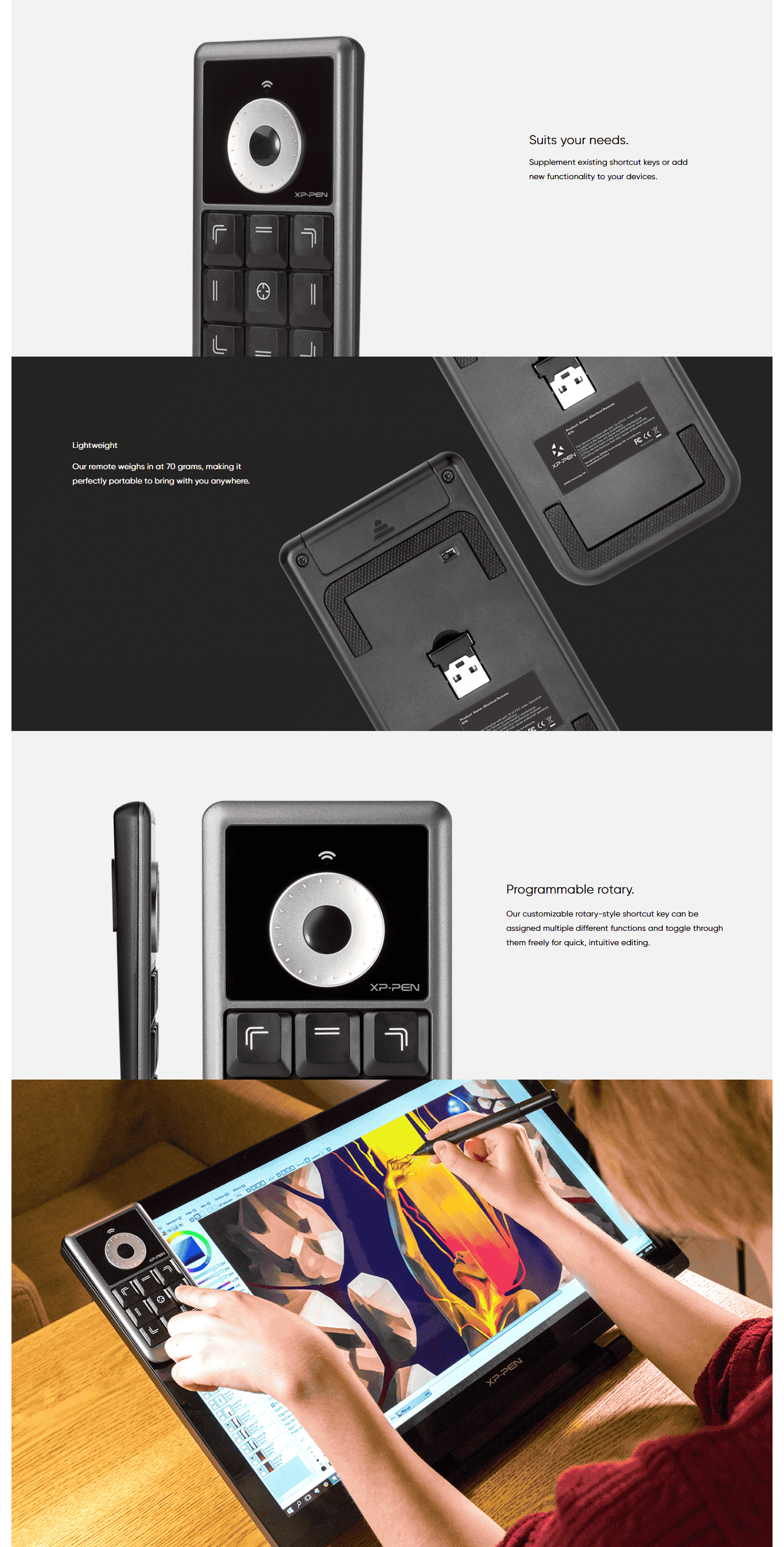
XP‑Pen AC19 Shortcut Remote is a compact, wireless controller with 10 programmable buttons and a rotary dial. It connects via 2.4 GHz dongle, Bluetooth, or USB, stores custom profiles onboard, and works cross-platform—ideal for quick-access shortcuts in creative apps.
| Usable With Both Hand | Yes |
|---|
AC19 Shortcut Remote PRICE IN PAKISTAN
The XP-Pen AC19 Wireless Shortcut Remote is a powerful, portable accessory designed to enhance the productivity and workflow of digital artists, illustrators, designers, video editors, and educators who use graphic tablets and pen displays. Built to serve as a compact yet versatile command hub, the AC19 is equipped with 10 fully customizable shortcut keys and a multi-function rotary dial, allowing users to access frequently used tools and commands instantly—eliminating the need to rely on a full keyboard during creative sessions. The shortcut keys can be mapped to a wide range of functions such as brush size adjustments, undo/redo, zoom in/out, switching tools, and more. The dial adds a layer of intuitive control, enabling smooth zooming, scrolling, canvas rotation, and precise slider adjustments, depending on how it is configured. Whether you're sketching in Photoshop, editing in Premiere Pro, painting in Clip Studio Paint, or retouching photos in Lightroom, the AC19 helps streamline complex workflows into a fluid, efficient process.
Designed for comfort and portability, the AC19 fits naturally in your hand and features a slim, lightweight body that is easy to carry or reposition during work. It connects wirelessly to your system via a 2.4GHz USB dongle, ensuring a stable connection with minimal lag, and it is powered by a single AAA battery, which can last for weeks depending on usage. This means you can enjoy full mobility without worrying about frequent recharging. The AC19 is compatible with Windows, macOS, and Linux, and once the XP-Pen driver software is installed, each key and the dial can be customized on a per-application basis—giving you different profiles for different software programs. This level of personalization makes the AC19 a truly adaptable device, especially for professionals who switch between tools like Illustrator, ZBrush, Blender, or Krita throughout the day.
A major advantage of the XP-Pen AC19 is its ability to enhance ergonomics and reduce wrist fatigue. Instead of reaching repeatedly for the keyboard or screen menus, users can keep one hand on the stylus and the other on the remote, making the creative process smoother and more comfortable. It is especially beneficial for users of large pen displays or multiple monitor setups, where traveling across the screen to find specific commands can interrupt the creative flow. Additionally, the AC19 is often praised for being a cost-effective alternative to more expensive express key remotes from other brands, offering comparable functionality at a fraction of the price. Some versions of the remote even come with firmware updates or support wired mode via USB, depending on the model and region.the XP-Pen AC19 Wireless Shortcut Remote is widely appreciated for its ability to dramatically enhance creative efficiency by placing all your most-used shortcuts, tools, and navigational controls into a single, portable device. The rotary dial is especially powerful—it supports clickable rotation in both directions, and depending on the software you're using, it can be set to zoom in/out, scroll vertically or horizontally, rotate your canvas, or even adjust brush size with fine-tuned precision. This dial is especially useful for digital painters, editors, and CAD designers who often work on highly detailed projects and require nuanced control over the interface. The tactile feedback of the dial and keys gives users a satisfying, responsive interaction—similar to physical mixing boards or video editing consoles—offering a much more immersive, hands-on experience than clicking through software menus.
The customizability of the AC19 is one of its greatest strengths. Through XP-Pen's driver software, users can create custom profiles for different programs, meaning your remote behaves differently in Photoshop than it does in Illustrator, Blender, or DaVinci Resolve. This ability to create app-specific shortcut layouts helps professionals transition effortlessly between creative tasks without stopping to manually reassign buttons every time they switch software. Each of the 10 programmable keys can be mapped to standard functions like keystrokes or mouse clicks—or even complex multi-key macros—letting you condense a multi-step workflow into a single button press. For educators or streamers, this is particularly helpful in live settings where speed and accuracy matter.
Another big advantage of the AC19 is its form factor. Unlike full-sized keyboards or bulky control surfaces, the AC19 is small enough to be held in one hand or kept next to your tablet without taking up too much space. It’s a great choice for users with limited desk real estate or minimalist setups. The AAA battery powering it typically lasts 1–2 months with regular use, depending on your settings and the frequency of inputs, and because it doesn’t rely on built-in lithium batteries, you never need to pause for recharging—just swap the battery when needed. The 2.4GHz wireless dongle ensures stable, lag-free connection even in busy workspaces, and the remote reconnects instantly after idle periods, so you don’t lose momentum during long sessions.
What also sets the AC19 apart is its broad compatibility—not only does it work flawlessly with XP-Pen tablets, but it also integrates well with third-party software across Windows, macOS, and Linux platforms. That makes it an excellent universal companion for artists, editors, developers, and office professionals who want a dedicated, customizable shortcut controller without paying the premium that comes with some name-brand alternatives. It can also be used in non-art workflows, such as controlling presentation slides, video conferencing tools, or even navigating spreadsheets and documents in office environments—highlighting its versatility beyond creative tasks.