
Overview
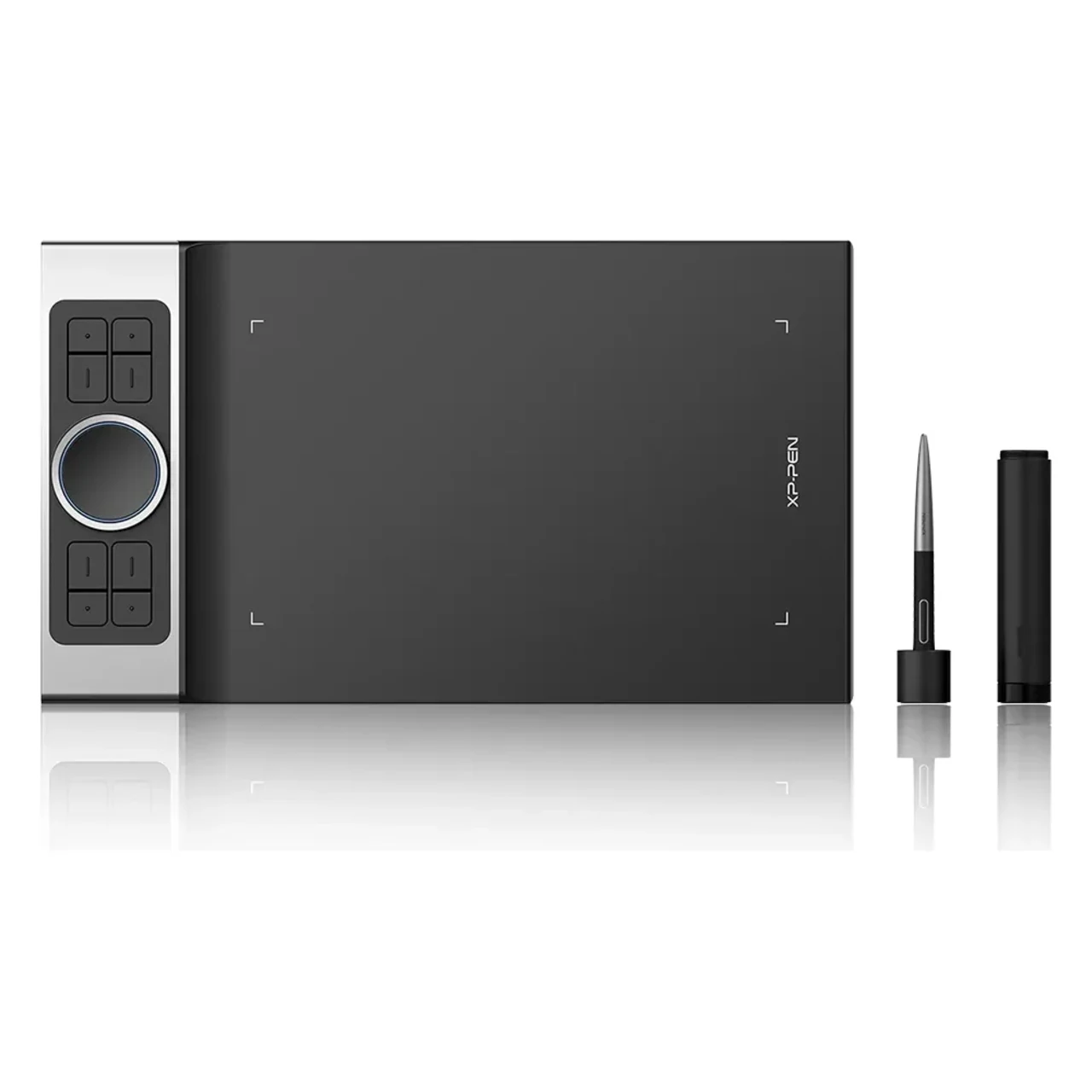
XP‑Pen Deco Pro Small is a 9×5″ premium graphics tablet with a sleek 7 mm aluminum body, dual control dial, and 8 shortcut keys. It includes a battery-free stylus with 8,192 pressure levels, 60° tilt support, and supports Windows, macOS, Linux, Android, and Chrome OS—perfect for precise digital art and productivity.
| Usable With Both Hand | Yes |
|---|

XP Pen DECO PRO SMALL PRICE IN PAKISTAN
The XP-Pen Deco Pro Small is a professional-grade pen tablet designed for digital artists, designers, illustrators, educators, and remote professionals who demand precision, control, and a sleek user experience in a compact and portable form. Featuring an award-winning design—recognized by the 2019 Red Dot Design Award and 2018 Good Design Award—the Deco Pro Small showcases XP-Pen’s attention to innovation and ergonomics. It sports a durable aluminum-alloy body with a thin 7mm profile, blending form and function in a way few tablets in this price range can match. The tablet features a 9 x 5-inch active area, which provides ample space for detailed drawing, editing, or note-taking, while still being compact enough for travel or tight desk setups. The working surface has a fine textured finish that mimics the feel of paper, providing both control and comfort during long creative sessions.
What truly sets the Deco Pro Small apart is its dual control dial interface, which combines a mechanical rotating dial with a touch-sensitive virtual wheel. This unique combo allows users to perform multiple functions—such as zooming, scrolling, changing brush sizes, and rotating canvas—with precision and ease, all from a single control area. Surrounding the dial are eight customizable shortcut keys, each tactile and programmable via XP-Pen’s driver software. These keys and dials are also softly backlit, providing visual guidance and usability even in low-light environments. This layout gives artists a faster, more efficient workflow, reducing reliance on the keyboard and allowing for a more immersive creative process.
At the core of the drawing experience is the PA1 battery-free stylus, which delivers 8,192 levels of pressure sensitivity, 5080 LPI resolution, 60° tilt support, and a high report rate, ensuring smooth, accurate strokes every time. The stylus has a comfortable rubber grip, a low initial activation force, and two side buttons that can be customized to act as shortcuts, such as toggling between brush and eraser. While it does not include an eraser on the back like some premium styluses, the pen’s responsiveness and accuracy make it suitable for detailed illustration, fine line work, photo retouching, and other high-precision creative tasks. XP-Pen also includes a protective pen case, spare nibs, and USB adapters to ensure the tablet is ready to go out of the box.
In terms of connectivity, the Deco Pro Small uses a modern USB-C interface, offering plug-and-play convenience and broad compatibility with Windows, macOS, Linux, and Android operating systems. This makes the tablet a flexible choice for users working across different platforms. The driver software is user-friendly and allows for full customization of pressure curves, shortcut keys, work area mapping, and rotation (great for left-handed users). The Deco Pro Small is also compatible with all major creative software including Photoshop, Illustrator, Clip Studio Paint, Krita, CorelDRAW, Blender, and even productivity apps like Microsoft OneNote and Zoom, making it equally useful for digital art and online education or meetings.
Users consistently praise the Deco Pro Small for its premium build quality, excellent pen performance, and efficient control layout. The combination of the mechanical and virtual wheels is particularly loved by users who prefer tactile feedback with modern multi-function control. While some users mention that very light strokes might not register as easily out of the box, this is easily fixed with pressure curve customization in the driver. The tablet is designed for both left- and right-handed users, and with its lightweight build and included accessories, it’s ideal for both studio and mobile workflows.
the XP-Pen Deco Pro Small demonstrates how thoughtful design and performance engineering can come together to create a truly refined user experience. Its compact yet durable aluminum chassis feels premium in hand and is built to withstand years of use, making it an ideal choice not just for at-home creatives but also for professionals on the go. Whether you're working at a coffee shop, in a classroom, or a shared studio space, the Deco Pro Small is slim and lightweight enough to fit easily into most backpacks or laptop bags without sacrificing functionality. The edge-to-edge build and minimalist finish give it a modern aesthetic that reflects the evolving needs of today’s hybrid creative workforce.
One of the standout aspects of the Deco Pro Small is the dual-wheel system, which truly enhances productivity. The physical dial allows for tactile feedback, giving you precision control over functions like brush size, layer switching, or canvas rotation. The capacitive touch wheel, on the other hand, adds gesture-based fluidity—enabling smooth zooming, scrolling, and even swipe gestures in supported software. This dual input method lets you multitask and control various functions with a single hand movement, keeping your other hand focused on the pen. Together with the eight express keys—each of which can be mapped to specific shortcuts per software—you get a customized workflow that caters precisely to your creative process.
The PA1 stylus complements this hardware beautifully. It's not only lightweight and comfortable to hold, but its non-battery design means there's never any need to recharge. It glides effortlessly across the Deco Pro's textured surface with minimal friction, providing a natural, pen-on-paper feel. The tilt recognition adds another dimension of control, allowing for dynamic shading and line variation, especially in applications that support tilt-based input like Photoshop or Clip Studio Paint. For illustrators, this can dramatically improve line weight and brush realism, while designers can achieve more expressive strokes and accurate pressure transitions. Thanks to minimal parallax and a high 5080 LPI resolution, every movement translates with fidelity, making this tablet an excellent match for detailed vector work, hand-drawn art, or even architectural sketching.
XP-Pen’s driver software further expands the tablet’s capabilities, offering fine-tuned customization of pressure sensitivity curves, shortcut profiles, screen mapping, and multi-monitor setups. The Deco Pro Small supports working across multiple displays, allowing users to map different screens or portions of screens to the tablet’s surface—perfect for digital artists who use reference monitors or dual-screen layouts. The cross-platform support is particularly strong; it works seamlessly with Windows 10/11, macOS, Linux distributions, Android (via USB OTG), and Chrome OS. This ensures you can plug the Deco Pro into almost any modern computer or tablet and get started quickly.
For educators and remote workers, the Deco Pro Small also serves as a powerful communication tool. In platforms like Zoom, Google Meet, Microsoft Teams, or OneNote, it allows for live annotation, diagramming, and whiteboarding. Teachers can explain concepts more clearly with handwritten visuals, while business professionals can sign documents or brainstorm ideas in real-time with colleagues.
Lastly, XP-Pen has backed the Deco Pro Small with a robust package of accessories: you’ll receive a protective case, pen holder, USB-C cable, nib extractor, replacement nibs, and USB adapters for both USB-A and USB-C ports—ensuring compatibility with new and older devices. This level of attention to detail underscores XP-Pen’s commitment to offering real value without cutting corners.